I feared the trackpad. I am not the biggest fan of the trackpad. I gather that my namesake, the CTO at Synaptics is responsible for some of the biggest breakthroughs as the trackpad gained laptop cred during the 1990’s and 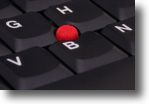 so I feel a little loyalty if only by association. However, my favourite means of input is the TrackPoint – the little red nubby (that becomes less red real fast) that the IBM ThinkPad is most closely associated with. This is a very personal area. I know many users that could just not get used to using a single finger on an ultra-sensitive tiny joystick. The cursor and they could not become friends with the TrackPoint in the equation. Random survey indicates most people still carry a mouse with them and connect it – this is the case for TrackPoint as well as trackpad users. I am glancing around the coffee shop right now and frankly I am the only one relying on the built in tracking device. There’s a lot of users with big mice and small mice, but mice nonetheless. There is even a user carefully balancing one on the arm of an easy chair – that can’t possibly be comfortable.
With apologies to Douglas Englebart, I cannot go back to the mouse. Not for the laptop, and only grudgingly for the desktop. I gave the mouse another try for the last week as I wasn’t convinced that the TrackPad was hacking it. Conclusion, the mouse is even more foreign to me now. I used a nice little Apple Mighty Mouse. Lots of surfaces to associate with different outcomes, but it just doesn’t feel right. There was a time when it did. I used a nice Microsoft laser mouse for the first few weeks with the first ThinkPad I used. And then I got used to the TrackPoint. Very used to the TrackPoint. Heresy of heresies, I actually preferred using it for work in Illustrator and Photoshop, compounding the fact that I was using these applications on a Windows-based machine. My first Apple Portable was the venerable box from 1989? that had a trackball as input device. I liked the TrackBall…and still do. It fits my hand and lets me use my fingertips with percision. My thumb and/or pinky drop down and control the clicking surface. Even Lenovo (just to keep it current IBM actually made the choice) offers all but the small X series with both the TrackPoint and a TrackPad.
Maybe my choice of Point-Pad-Ball is because I don’t touch type. I am proud of the fact that I have a very rapid rate using about 4 digits, I know it doesn’t rival you speed demon TT’s, and that’s probably the majority these days. Its me, I don’t touchtype and that may impact on input device of choice. Maybe the TrackPoint gets in the way of folks having to surrender a digit (but ultimately a full hand) to navigation. 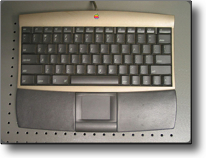
When I got a Twentieth Anniversary Macintosh in 1997, it came with a beautiful leather wrapped keyboard on a tether which I immediately lengthened. In the middle of the palm rest was a decent sized trackpad for input. Apple didn’t ship a mouse with this piece of art. In fact, you could remove the trackpad out of the keyboard and Apple included a leather piece to put in the missing space. The trackpad could then be used separately and had its own cord. It was all very neat. This factor alone convinced my Mother that she wanted one of these as well.
At that time I found the trackpad so, so. It wasn’t my chosen means of input, but the 20th Anniversary wasn’t my main machine, so occasional use was ok.
Input devices have come a long way since then and our haptic transition to gesture-based inductive sensing has created the usual iFrenzy. Its probably the future and trying pinching and the like on an iTouch or iPhone is very cool. Not sure its for me, but haven’t indulged in such toys – yet. But what I can conclude is that I am no longer a mouse kida guy. I probably will always mark the TrackPoint my favourite, but back to the TrackPad.
The PowerBook 12inch has a tiny trackpad. Its far more sensitive and discrete than the trackpads on my TAM or on my PowerBook 540c. I have installed