
Last week Stéfan Sinclair noted that his upgrade to Leopard had largely been a less 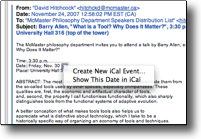 than awe-inspiring experience. he did find some amusement with the new Mosaic screensaver and I will admit that after trying it on his instigation, it’s pretty cool. I have to add another rather impressive addition to the list. DataDetectors! Wow. I can remember being one among many that saw the power of this sort of recognition of disjointed info on the Newton and having it take a scribble about lunch with Joe and make some assumptions and create an event in your calendar linked to the first Joe it found in your address book. So, Apple’s been playing with the technology for awhile. DataDetectors are so subtle that I suspect many people might be missing them. I did. Then the other day, I happened to note the little rectangle form itself around a date and time with a little arrow. I remember that Steve Jobs had mentioned this during a keynote at some point. I clicked the arrow and asked Mail.app to create a new iCal event. Colour me impressed. It created an event at the exact right time and date figured out that the data adjacent to place: was what it was and populated that field and even caught the topic of the presentation making that the event title. It really worked. Imagine my amazement. No ‘freckled eggs’ 😉 I will have to tpy with this a little further and see how well it works with info not so nicely formatted, but so far…very impressed. I know that MailTags are much more powerful, but I am impressed with the simplicity of DD.
I am a big fan of integration of tools such as email and calendar and address book. Outlook does do a fine job with this under Windows, but Apple has taken a different tack by wiring these things at a deeper layer of the OS. Theoretically this should allow use to choose favoured apps and thus have greater freedom to work the way that we want to work. I like this.

[…] years now. It should be rock solid. It’s not – yet. I recently wrote about my impressions of data detectors. Not rocket science, but a small and powerful addition to useful workflow on a Mac. That they also […]
[…] years now. It should be rock solid. It’s not – yet. I recently wrote about my impressions of data detectors. Not rocket science, but a small and powerful addition to useful workflow on a Mac. That they also […]